
Tax Return Rejected? Here's What It Means and How to Fix It
When a tax return is e-filed and is rejected, it is often due to taxpayer information that has been entered incorrectly and does not match what the Internal Revenue Service (IRS) is expecting. In most cases, the fix is straightforward: correct the error and resubmit your return.
E-File.com notifies you by email as soon as a rejection is received, along with the reason for the rejection, so you can correct and resubmit your return directly on the platform at no additional charge.
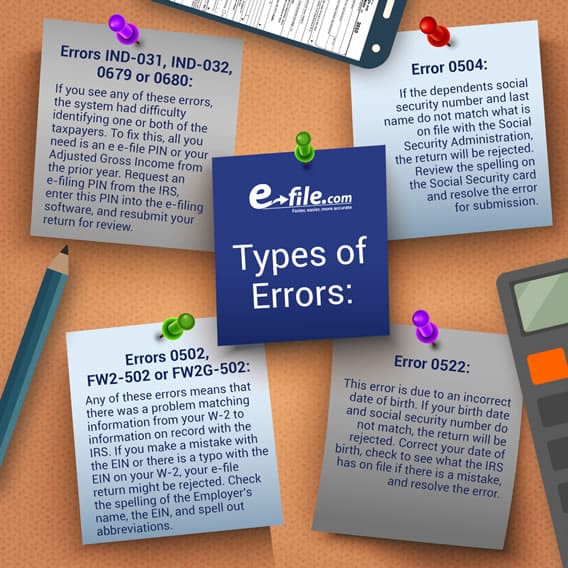
Below you will find a list of the most common IRS e-file rejection codes for electronically filed tax returns.
What Does It Mean When the IRS Rejects Your Tax Return?
Rejection happens when the IRS's automated system checks your return against its database before it's ever processed. If something doesn't match, the system rejects the return and sends it back with a specific rejection code. A rejected tax return is not the same as an audit, and it does not mean you owe additional taxes.
Once you receive the code and correct the underlying issue, you can resubmit. Often, rejections are resolved in a single correction. Sometimes, other issues will require you to file your return by mail. For a step-by-step walkthrough, see our guide on how to fix a rejected tax return.
Common Reasons for Tax Return Rejection
There are numerous reasons why a return may be rejected. These are some of the most frequent causes of rejection when filing Form 1040 returns electronically.
Mismatched Personal Information
This rejection happens when the personal information you provided does not match the information on file with the Social Security Administration (SSA). This is often the most frequent cause for a return being rejected. If information provided by you or your spouse, such as your Social Security Number (SSN), name or birth date is either incorrect or does not match what the IRS is expecting, the IRS will reject your return.
Rejection codes:
- Primary taxpayer SSN mismatch: R0000-500-01
- Spouse SSN mismatch: R0000-503-02 and/or R0000-504-02
- Date of birth mismatch: F1040/F1040A/F1040EZ-524-01
Return Already Filed with Your SSN
This rejection occurs when someone has already e-filed a return with the same taxpayer number, either the Social Security Number (SSN) or Tax Identification Number (TIN). This most often occurs because a spouse has already e-filed a return for the current year, or if a duplicate return was submitted in error.
This rejection can also occur when someone has used your information to file a fraudulent return. If you believe you are the victim of a tax-related identity theft, you'll need to contact the IRS and submit Form 14039 (Identity Theft Affidavit).
Rejection codes: R0000-902-01 and/or IND-510
Dependent Claimed On Another Return
If you claim a dependent that is also being claimed on another taxpayer's return in the same tax year, your return will be rejected. This can occur when there is confusion or a lack of communication by custodial and non-custodial parents or guardians regarding who claims the dependent.
To fix, you'll need to coordinate with the other filer to determine who has the legal right to claim the dependent, and then resubmit.
Rejection codes: R0000-507-01 and/or SEIC-F1040-521-02
Dependent Filed Their Own Return
If the person you are claiming as a dependent has already filed a tax return for the year, either claiming themselves or being claimed by another taxpayer, your return will be rejected.
Rejection code: F1040-512
Electronic Signature Mismatch
Electronically transmitted tax returns require either the taxpayers' Adjusted Gross Income (AGI) from last year or Identity Protection Personal Identification Number (IP PIN) to electronically sign the return and verify your identity. Either your AGI or PIN must match the IRS database, so this rejection occurs when an incorrect AGI or PIN is entered.
If your AGI is rejected, verify the AGI figure on line 11 of your prior-year Form 1040. If you filed late or your return was adjusted, the IRS may have a different figure on file. You can retrieve your exact prior-year AGI by viewing your tax records in your Individual Online Account on the IRS website. If you did not file a return last year, enter $0 as your AGI.
If your IP PIN is rejected, confirm your current-year IP PIN at IRS.gov/ippin. IP PINs change every year, so using a PIN from a prior year will trigger this rejection.
Codes for bad PIN: IND-180-01 and/or IND-183-01
Codes for bad AGI: IND-031-03 and/or IND-032-03
EIN Does Not Match IRS Records
A return will also be rejected if the Employer Identification Number (EIN) on the tax return does not match what the IRS has in its database. Verify the EIN against your actual tax document (W-2 or 1099-R) and make sure the 9-digit number is in the correct format and you correct any errors before resubmitting.
Companies based in the United States that issue W-2s to employees must have a valid EIN. However, foreign employers are not bound by this requirement. If you received compensation from a foreign employer last year, you must report it to the IRS. These wages can be reported as foreign employer compensation without an EIN.
Rejection codes: FW2-502, FW2G-502 and/or F1099R-502-02
Steps to Take After Your E-File Return Is Rejected
Here is what to do if your e-file return is rejected:
- Read the rejection notice carefully. E-file.com will email you the rejection code and a plain-language explanation as soon as the IRS sends it back. Identify the specific code before making any changes.
- Correct the error. Go to the section of your return that triggered the rejection and fix the issue. Use the rejection codes section above to understand exactly what to address.
- Review the rest of your return. While you're in there, confirm that all other names, numbers and supporting documents are accurate.
- Resubmit electronically. Once corrected, resubmit your return through E-file.com. There is no additional fee to resubmit.
- Confirm acceptance. You will receive a second notification when the IRS accepts the corrected return.
If your original return was submitted on time and you correct and resubmit it within the window before the deadline (or within 5 calendar days if rejected on/after Tax Day), no late-filing or late-payment penalty applies. The IRS does not set a limit on the number of times you can resubmit a rejected return.
What's the Difference Between a Rejected and an Amended Tax Return?
A rejected return is sent back to you before the IRS processes it. You correct the specific error and resubmit the original return. No new form is required. If your return was rejected, you can fix the rejection issue and resubmit your original return.
An amended return (Form 1040-X) is filed after the IRS has already accepted and processed your return. You use an amended return to correct errors you discovered after acceptance, such as a missed deduction, wrong filing status or income that was not reported. Amended returns cannot be used to fix a rejection.
How to Prevent Your Tax Return from Being Rejected
Before submitting, confirm the following:
- Your name is spelled exactly as it appears on your Social Security card
- All SSNs for you, your spouse and any dependents are correct
- Your prior-year AGI matches line 11 of last year's Form 1040 (or is $0 if you didn't file)
- If you have an IP PIN, you are using the current year's PIN, not last year's
- All EINs on your W-2s and 1099s match your actual tax documents
- You are the only person claiming each dependent on your return
E-file.com makes this easier. Our software flags common errors such as mismatched names, incorrect SSNs and AGI discrepancies before you submit, so mistakes are caught on your end rather than the IRS's. And because E-file.com walks you through your return step by step, most filers finish faster than they expect, making it easier to file well ahead of the deadline.
Ready to file? Start your return today.
Frequently Asked Questions
What happens if your tax return is rejected?
A rejected tax return is returned to you by the IRS before it is processed. The rejection notice contains a specific code that identifies the exact error. You'll need to correct the error and resubmit your return. Your filing obligation is not satisfied until the IRS accepts it.
How long do I have to fix a rejected tax return?
You must correct and resubmit a rejected return before the tax filing deadline, typically April 15. If the IRS rejects your return on or after the deadline, you have five calendar days to resubmit electronically. If you are mailing a paper return instead, the IRS requires it to be postmarked within 10 calendar days of the rejection notification.
How many times can I resubmit a rejected tax return?
The IRS does not limit the number of times you can resubmit a rejected return. You may continue resubmitting until the return is accepted, provided you remain within the applicable deadline window.
Can I file taxes again after being rejected?
Yes. A rejected return has not been filed or recorded by the IRS. You are both permitted and required to refile. Correct the issue identified in your rejection notice and resubmit your original return to complete your filing.